How Christian Authors Can Use Amazon A+ Content to Strengthen Book Pages
Amazon A+ Content lets authors add images, text, book previews, and comparison sections to book detail pages. Learn how Christian authors can use it to explain their books more clearly and professionally.
A reader finds your book on Amazon.
They see the cover.
They read the title.
They scan the description.
Then they keep scrolling.
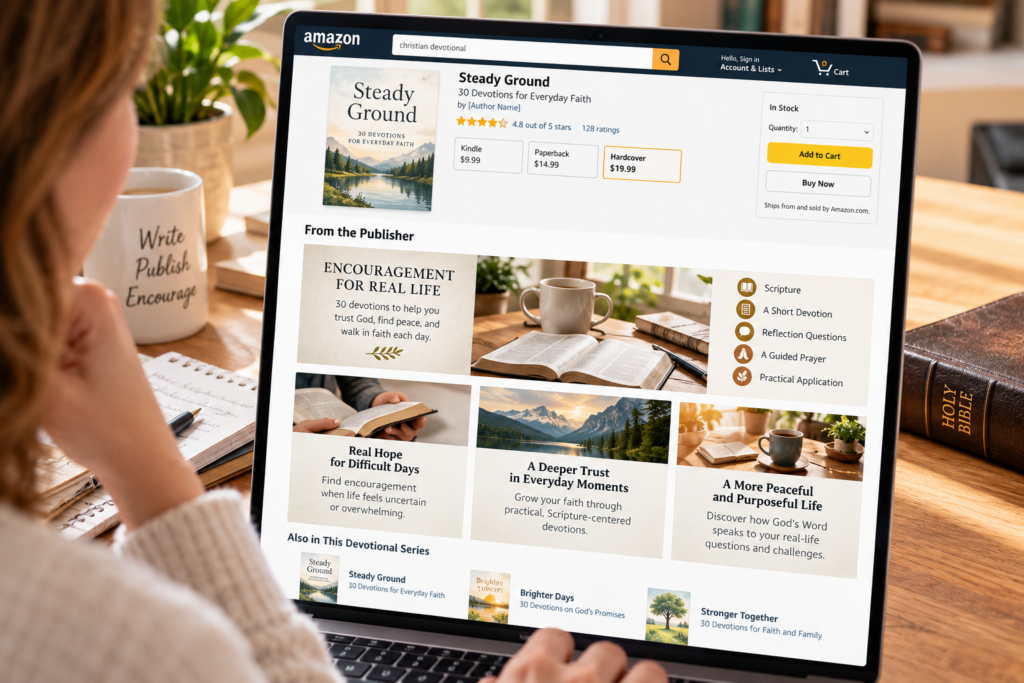
Amazon A+ Content gives authors another opportunity to explain what the book offers through images, text, comparison charts, and visual sections placed under the From the Publisher area of the book detail page.
For Christian authors, that can be especially useful.
A devotional can show its daily structure.
A Bible study can preview what readers will explore.
A children’s book can introduce its visual world.
A Christian novel can communicate setting, themes, or series connections.
A+ Content does not replace a strong cover or description.
It gives interested readers more reasons to understand the book before making a decision.
What Amazon A+ Content Actually Is
A+ Content is an enhanced section authors can add to eligible published KDP book pages.
Instead of relying only on ordinary product-page text, you can combine:
- images
- headings
- short text sections
- author information
- comparison tables
- visual book samples
- series information
Amazon currently provides multiple module layouts, and authors can combine up to five modules in one A+ Content layout. Amazon Kindle Direct Publishing
The content appears farther down the book detail page, so it is primarily serving readers who are already interested enough to continue exploring.
That makes A+ Content a decision-support tool, not usually the first thing that gets someone to click the book.
A+ Content Is Not Just for Hardcover Books
This is the most important correction to the previous article.
A+ Content is not reserved for hardcover editions.
Amazon allows A+ Content to be associated with published KDP book ASINs, and one project can be applied across multiple relevant book formats.
So you do not need to create a hardcover simply to gain access to A+ Content.
That changes the strategy completely.
The question is no longer:
Should I publish a hardcover just to unlock A+ Content?
Instead ask:
Would additional visual information help this reader understand or value this book?
For many Christian books, the answer is yes.
Start With the Reader Question
Do not open the A+ builder and start adding attractive images randomly.
First decide what the potential buyer still needs to understand.
For example:
A devotional shopper might wonder:
- How long are the daily readings?
- Is Scripture included?
- Are there prayers or reflection questions?
- Who is this devotional written for?
A Bible-study buyer may want to know:
- How many sessions are included?
- Is it designed for individuals or groups?
- Is there space to write?
- What themes are covered?
A fiction reader may want:
- a better feel for the setting
- major themes
- the emotional tone
- where the book fits within a series
A+ Content should answer questions like these visually.
Use A+ Content to Show Structure
This may be one of the strongest uses for Christian nonfiction.
Suppose you publish a 30-day devotional.
Your ordinary description explains the concept.
A+ Content can visually show:
Each Day Includes
Scripture
Short devotional reading
Reflection question
Prayer
Practical application
That gives readers an immediate picture of what using the book will feel like.
For a Bible study, you might show:
Inside Each Session
Read
Observe
Reflect
Apply
Pray
The goal is not decoration.
It is clarity.
Show the Reader What the Book Experience Feels Like
A strong A+ section can communicate atmosphere and experience better than another paragraph of sales copy.
For a grief devotional, the visuals might feel quiet and reassuring.
For a Christian children’s book, they might feel bright and inviting.
For a historical Christian novel, the imagery might reinforce period and setting.
For a Bible-study workbook, the visuals might emphasize organization, writing space, and practical use.
The imagery should match the actual book.
Do not create a visual promise the interior does not deliver.
A Devotional Can Preview the Journey
Consider a devotional about trusting God during uncertainty.
Instead of merely saying:
Thirty encouraging devotionals for difficult seasons
an A+ sequence might show three visual themes:
When You Cannot See the Way Forward
Trust during uncertainty.
When Waiting Becomes Heavy
Faith during unanswered seasons.
When Peace Begins to Return
Learning to rest in God’s promises.
Now the reader sees progression.
That is much more powerful than simply repeating the description.
Bible Studies Can Show the Learning Structure
Bible studies are especially suitable for A+ Content because their structure matters to buyers.
You could create sections showing:
Study Focus
What biblical topic or book is explored?
Session Format
How does the reader work through each lesson?
Who It Serves
Individual study?
Women’s group?
Church small group?
New believers?
Experienced students?
What Readers Need
Bible
Workbook
Pen
Time for reflection
This reduces uncertainty before purchase.
Christian Fiction Needs a Different Approach
Do not turn fiction A+ Content into a workbook-style feature list.
Fiction sells through curiosity, emotion, setting, and character.
Useful modules might introduce:
- the world or setting
- central emotional conflict
- major themes
- series order
- other books from the author
For example, a Christian historical novel could visually introduce:
The Place
The Conflict
The Choice
without revealing major plot developments.
A+ should deepen interest, not spoil the story.
Use Comparison Charts for Series
Amazon’s comparison modules can be useful when you have multiple related books.
A Christian fiction series might show:
Book 1
Book 2
Book 3
with brief differences in setting or story focus.
A devotional collection could compare:
Hope
Prayer
Grief
Family
Trust
This can help readers discover the next appropriate book without leaving the author ecosystem.
For Faith Author Hub readers planning multiple books, this is one of the strongest long-term uses of A+ Content.
Author Information Can Build Connection
A+ Content can also introduce the author.
That does not mean writing another long biography.
Use a short section to explain why you created the book.
For example:
Why I Wrote This Study
A pastor might explain what question kept appearing in counseling conversations.
A devotional writer might describe the season that inspired the collection.
A Christian children’s author might explain the need they saw among parents.
Keep the focus on the reader.
The author story should explain why the book exists, not simply list accomplishments.
Do Not Repeat the Book Description
This is one of the easiest mistakes to make.
You already have a product description.
A+ Content should expand the sales page rather than duplicate it.
If the description explains the book’s promise, A+ Content can show:
- structure
- experience
- audience
- visual atmosphere
- series relationships
- specific features
Every additional section should answer a question the ordinary product page does not answer as effectively.
Keep Text Short
A+ Content is visual.
That means paragraphs should usually be short.
Think:
headline
image
two or three sentences
rather than:
headline
400-word explanation
Readers scrolling an Amazon page are not approaching it like an article.
They are evaluating.
Make each module understandable quickly.
Design for Mobile Readers
A+ Content can appear differently depending on the device.
That makes simplicity important.
Avoid graphics containing tiny text.
Avoid complicated diagrams that only work on a large desktop monitor.
Avoid cramming an entire chapter summary into one image.
If you place text directly inside graphics, make sure it remains readable when the image becomes smaller.
Whenever Amazon provides a text field within the module, consider placing important wording there rather than baking all the copy into the image.
Use High-Quality, Relevant Images
The images should reinforce the book, not merely fill space.
Strong choices might include:
- styled interior-page previews
- carefully created thematic imagery
- illustrations from the book
- author photography
- series covers
- diagrams showing book structure
- feature callouts
- setting imagery for fiction
Generic stock photography can work, but it should have a clear purpose.
A random cup of coffee beside a Bible does not automatically explain a devotional.
The visual should communicate something specific.
Follow Amazon’s Content Restrictions
A+ Content has its own guidelines.
Avoid promotional claims such as:
- Buy now
- Free
- Best price
- Limited time
- On sale
- Latest
- Bestseller
Customer reviews are also not allowed as ordinary A+ Content.
Amazon restricts time-sensitive promotional language and has specific rules around endorsements and publication quotations.
That means A+ Content should emphasize the book itself, not pressure readers into buying it.
Avoid Unsupported Claims
Christian publishing sometimes uses phrases like:
This book will transform your marriage.
This devotional will eliminate anxiety.
This study will change your life.
Those claims are usually unnecessary anyway.
Show what the book provides.
Let readers decide what it may accomplish for them.
For example:
Instead of:
Transform your prayer life forever
try:
30 guided readings exploring consistency, honesty, gratitude, and trust in prayer
Specific information is stronger than exaggerated promises.
Consider Accessibility When Building Images
Images in A+ Content require descriptive alt text.
That deserves real attention.
Do not write alt text for search engines.
Write it for someone who cannot see the image.
Instead of:
Christian devotional book keywords faith prayer trust
write:
Open devotional beside a journal showing the daily Scripture, reflection, and prayer format
That actually describes the visual.
Accessibility is part of professional publishing.
How Many Modules Should You Use?
Amazon currently allows up to five modules in a detail-page layout.
You do not need to use all five.
For many books, three strong modules may be enough.
A devotional might use:
Module 1: Core promise
Who the devotional serves.
Module 2: Inside each day
Show the daily structure.
Module 3: Themes explored
Show several major topics.
Module 4: Author connection
Why the book was created.
A series might replace the author module with a comparison chart.
Build only what improves the reader’s understanding.
A+ Content for a Christian Children’s Book
A children’s book deserves a more visual approach.
You might use:
Meet the Main Character
Show the child or character readers will follow.
Inside the Story
Show two or three sample illustration environments.
Faith Theme
Explain the biblical or character lesson without turning the page into a sermon.
For Families
Describe age range and reading situation.
This gives parents more confidence about what they are buying.
A+ Content for a Christian Author With Several Books
Once you have a catalog, A+ Content becomes more strategic.
You can create a consistent visual identity across related titles.
For example:
Faith for Real Life Collection
Prayer
Trust
Grief
Family
Hope
Each book can show the others in a comparison module.
Now A+ Content is not only explaining one book.
It is helping readers understand your broader publishing catalog.
That is valuable for a growing Christian author brand.
Do Not Expect A+ Content to Rescue a Weak Listing
A+ Content appears below more fundamental buying information.
That means several things usually need to work first:
- cover
- title
- subtitle
- book description
- pricing
- reader fit
If the cover does not earn the click, many readers will never reach the enhanced content.
If the description confuses them, they may never scroll farther.
A+ Content strengthens an already coherent product page.
It does not repair a poorly positioned book.
Can You Measure Whether It Works?
KDP does not provide a simple A+ conversion dashboard telling authors exactly how many sales came from each module.
That makes precise attribution difficult.
Instead of obsessing over tiny changes, ask broader questions:
Does the page look more professional?
Does it answer common reader questions?
Does it communicate the book more clearly?
Does it help connect related books?
Does it make the product easier to understand?
Those are worthwhile goals even when you cannot assign a precise sales percentage to each module.
Update A+ Content When the Book Changes
A+ Content does not need to remain frozen forever.
Review it when:
- the cover changes
- a new series book launches
- positioning changes
- branding changes
- new related books become available
- old information becomes inaccurate
Series comparison sections are especially worth updating.
The content should reflect the current catalog.
Frequently Asked Questions
Can paperback books use Amazon A+ Content?
Yes. A+ Content is available for published KDP books and can be applied to relevant book ASINs and formats. It is not restricted to hardcover editions.
Do I need a hardcover to use A+ Content?
No. Creating a hardcover solely to gain access to A+ Content is unnecessary.
How many A+ modules can I use?
Amazon currently allows up to five modules in one detail-page layout.
Can I show customer reviews in A+ Content?
Customer reviews are not permitted as ordinary A+ Content. Amazon has separate rules governing acceptable publication quotes and endorsements.
Can I include prices or discounts?
No. Promotional and pricing language such as discounts, sales, free offers, or calls to purchase should not be included.
Can A+ Content show other books in my series?
Yes. Comparison modules can be particularly useful for presenting related books and helping readers understand a series or collection.
Should every book have A+ Content?
Not necessarily. It is most useful when images, structure, author context, series information, or additional explanation genuinely helps readers make a more informed buying decision.
How long does Amazon take to publish A+ Content?
Amazon currently advises that compliant content can take several business days to appear after submission, so do not build a launch plan around immediate approval.
Use A+ Content to Explain, Not Decorate
The best A+ Content is not simply attractive.
It is useful.
It helps readers answer:
Is this book for me?
What will I find inside?
How is it structured?
Where does it fit in the series?
Why did this author create it?
For Christian authors, that creates an opportunity to communicate purpose without turning the sales page into exaggerated marketing.
Show the reader what the book offers.
Make the experience easier to understand.
Then let the book earn the decision.